
For Hosts
Know who's cleaning, when, and how it went.
For flats, houses and guesthouses on Airbnb or Booking.com. Fewer messages, fewer phone calls: Mophop creates cleanings from your calendar, offers them to your team and shows you the proof.
Already have an account? Log in
Calendar
-
17Fri
Central Apartment
AnaCheck‑out 11:00Cleaning 11:00–14:00Check‑in 15:00
-
17Fri
Pine Guesthouse, room 2
MihaiIn progressCheck‑out 10:00Cleaning 10:30–12:00Check‑in 14:00
-
18Sat
Station Studio
No ExpertCheck‑out 11:00Cleaning 11:00–13:00Check‑in 16:00
Cleaning confirmedNeeds action
The calendar does the work.
Connect each property's calendar once. From then on, every check‑out becomes a cleaning, without you messaging anyone.
- Works with Airbnb, Booking.com, Vrbo and any iCal calendar.
- The same check‑out day in two calendars becomes a single cleaning, and Mophop lets you know.
- If the booking disappears from the calendar, the cleaning isn't removed automatically. We flag it and you decide.
- Need a cleaning without a booking? Add it manually.
- See everything as a list or by month, for every property.
Your team, for every property.
Each property has a primary Expert and, if you like, backup Experts. Every cleaning goes to the primary Expert first. If they don't respond within their priority window, it goes to the backup Experts automatically.
- Invite your Expert by e-mail, even if they don't have a Mophop account yet.
- Run a guesthouse? Invite the same Expert to all the rooms at once.
- Don't have anyone yet? The Mophop Marketplace shows Experts nearby, with their distance in km and their rating from other Hosts.
- Or post a single cleaning in the Marketplace and choose from the Experts who request it.
Central Apartment
- Cleaning created: 17 Oct, 11:00.
- Offer sent to Ana, primary Expert.
- Ana didn't answer within 12 hours.
- Offer sent to Mihai, backup Expert.
- Mihai accepted. The cleaning is confirmed.
Your checklist, with photos.
Until you create your own, cleanings use the standard Mophop checklist. Build yours room by room and choose where you want a photo.
- If you ask for a photo, the task can't be ticked off without one. The Expert can add up to 3 more.
- The cleaning can't be closed until every required task is done.
- Changes to the list only apply to future cleanings.
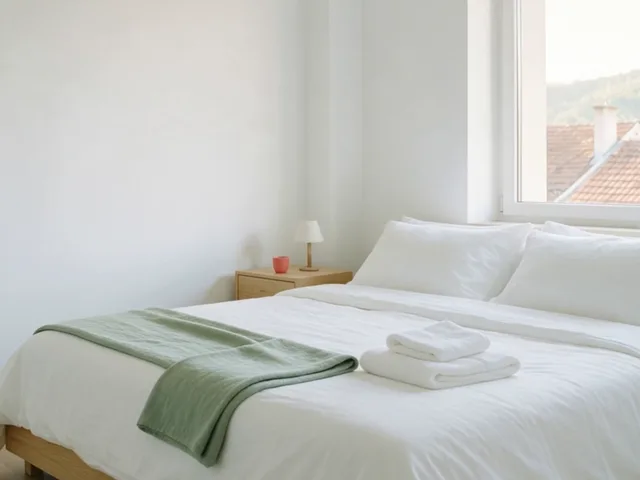 Bedroom · 14:28
6 of 6 tasks ticked
See everything, even when you're not there.
Follow the cleaning live: when it started, what's been ticked off and which photos have come in.
- You get an alert if the cleaning hasn't started, or hasn't finished, 30 minutes after the scheduled time.
- Problems are reported with a category, severity and photos: damage, missing items, supplies, access.
- You can message the Expert on each cleaning.
- Afterwards, you rate them from 1 to 5 stars. Their average shows on their profile.
You choose how you pay.
Set it separately for each Expert. Hosts pay no commission on cleanings: you only pay the Mophop subscription, which is free for up to 3 active properties. See pricing
- Outside Mophop
- You agree terms directly, as before, and Mophop just organises the work. Available for the Experts you invite.
- Protected payment
- Your card is charged 7 days before the cleaning, and the money is held by Stripe. After the cleaning, you have 24 hours to review it: if you report a problem, the payment is put on hold until it's resolved; if you do nothing, it goes to the Expert automatically.
- Mophop Marketplace
- Cleanings with Experts found in the Marketplace can only be paid through Mophop, with Protected payment.
More properties, just as organised.
Each property has its own calendar, checklist and team. In a guesthouse, each room counts as a property.
- The calendar shows all your properties. Filter by property, or see only what needs your attention.
- Payments by property and by status.
- Past cleanings are kept, with their checklists, photos and problems.
Frequently asked questions
Can I keep working with my current Expert?
Yes. Invite them by e-mail, even if they don't have an account, and choose whether you pay them through Mophop or directly. For Experts you invite, the Mophop commission is 0%.
What if the Expert doesn't respond?
The primary Expert has priority for between 10 minutes and 24 hours, depending on how soon the cleaning is. Then the offer also goes to the backup Experts, and once their priority ends, the cleaning goes to the Marketplace, where you choose from the requests. Until someone takes it, any of them can still accept it.
Who sees the door code?
Only the Expert who accepted the cleaning, from 12 hours before it starts until it's finished. The code is stored encrypted, and you can see every time it's viewed.
What if the guest cancels?
When the booking disappears from the calendar, the cleaning stays and is flagged for you to check. If you cancel it after the payment has been secured: more than 24 hours ahead, you get a full refund; between 24 and 4 hours ahead, half goes to the Expert; less than 4 hours ahead, the Expert gets the full amount.
Do I have to pay through Mophop?
No, not for the Experts you invite. Only cleanings with Experts from the Mophop Marketplace must be paid through Mophop.
Do I need to install anything?
No. Mophop runs in the browser, on your phone or your computer.
Start free with your first 3 properties.
Connect your calendar, invite your Expert, and your next cleaning organises itself.